
The Psychology of Website Trust: 7 Reasons Visitors Leave Your Website in Under 5 Seconds (And How to Fix Each One)
Here is a stat that should keep every business owner awake at night: 88% of online visitors will never return to a website after a single bad experience. Not because your product was bad. Not because your prices were too high. Because your website failed a psychological test that happened before the visitor even read a single word.
As a Web Developer and Industrial & Organizational Psychologist, I sit at a rare intersection — I build websites for a living, and I understand the invisible psychological forces that determine whether a visitor stays for 5 minutes or leaves in 5 seconds. And I can tell you with absolute certainty: most websites are hemorrhaging visitors because they fail basic trust psychology, not because of their content or products.
This article breaks down the 7 psychological trust mechanisms that visitors unconsciously evaluate within seconds of landing on your website — backed by peer-reviewed research from Stanford, Princeton, and Google — and provides actionable fixes you can implement today.
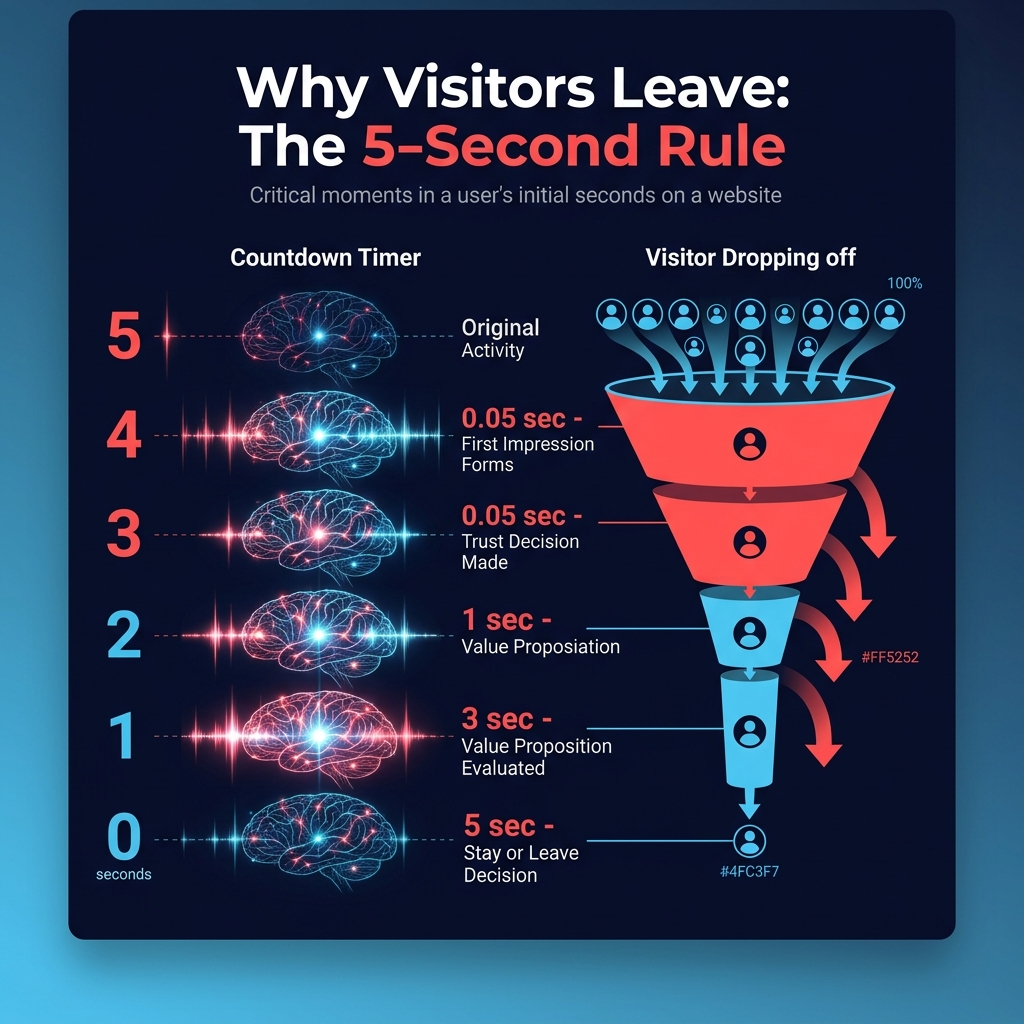
The Core Problem: You have exactly 0.05 seconds — fifty milliseconds — before a visitor’s brain forms its first impression of your website. That is faster than a blink. In that fraction of a second, your website either passes or fails a trust test that determines whether that visitor becomes a customer or a bounce statistic. Everything in this article is about winning that test.
The 50-Millisecond Trust Test: What Science Says About First Impressions Online
In 2006, researchers Gitte Lindgaard and colleagues at Carleton University published a landmark study in the journal Behaviour & Information Technology that changed our understanding of web design forever. They discovered that users form reliable aesthetic judgments about websites in as little as 50 milliseconds — one-twentieth of a second.
Think about what that means. In the time it takes your brain to process the color of a traffic light, it has already decided whether your website looks trustworthy, professional, and credible. This is not a conscious evaluation — it is a visceral, gut-level reaction driven by the amygdala (the brain’s threat-detection center) rather than the prefrontal cortex (the reasoning center).
Google’s own research in 2012 confirmed this with even more precision: they found that users judge a website’s visual appeal within 17 to 50 milliseconds — and that this snap judgment strongly predicted whether users would engage with the site or leave.
The implication is clear: your website’s visual design is not decoration — it is the single most important trust signal you have. Let us break down the 7 specific trust dimensions that visitors evaluate, consciously and unconsciously, within those critical first seconds.
Trust Signal #1: Visual Design Quality — “Does This Look Professional?”
The Psychology
The Aesthetic-Usability Effect, documented by researchers Masaaki Kurosu and Kaori Kashimura at Hitachi in 1995, demonstrates that users perceive aesthetically pleasing designs as inherently more usable, more credible, and more trustworthy — even when the beautiful design is objectively harder to use than a plain one.
This is not vanity — it is evolution. Our brains evolved to associate beauty with health, competence, and safety. A well-designed website triggers the same neural pathways as meeting a well-dressed professional: “This person cares about details. They are probably competent. I can trust them.”
Conversely, a poorly designed website triggers the same alarm bells as a doctor’s office with peeling paint and broken furniture. The logical brain says, “Maybe the doctor is great despite the office.” The emotional brain says, “Run.”
What Visitors Actually Evaluate (In Milliseconds)
- Color harmony: Are the colors cohesive, or do they clash? Dissonant colors trigger subconscious anxiety
- Typography: Is the font professional, or does it look like a 2005 template? System default fonts (Times New Roman, Arial) signal “low effort”
- Whitespace: Is the layout breathing, or is it crammed? Cluttered layouts trigger cognitive overload
- Visual hierarchy: Can the eye naturally flow from headline to content to call-to-action? Or does the page feel chaotic?
- Image quality: Are photos high-resolution and relevant, or pixelated stock images from 2010?
The Fix
- Invest in professional web design — not a template. Templates are psychologically recognizable; visitors can sense “I have seen this layout before”
- Use a maximum of 3 fonts and 4 colors across your entire website
- Replace every stock photo with original photography or carefully curated, modern imagery
- Ensure generous whitespace — when in doubt, add more space, not more content
- Test your design with the “5-second test” — show someone your homepage for 5 seconds, then ask what they remember. If they cannot recall your value proposition, redesign
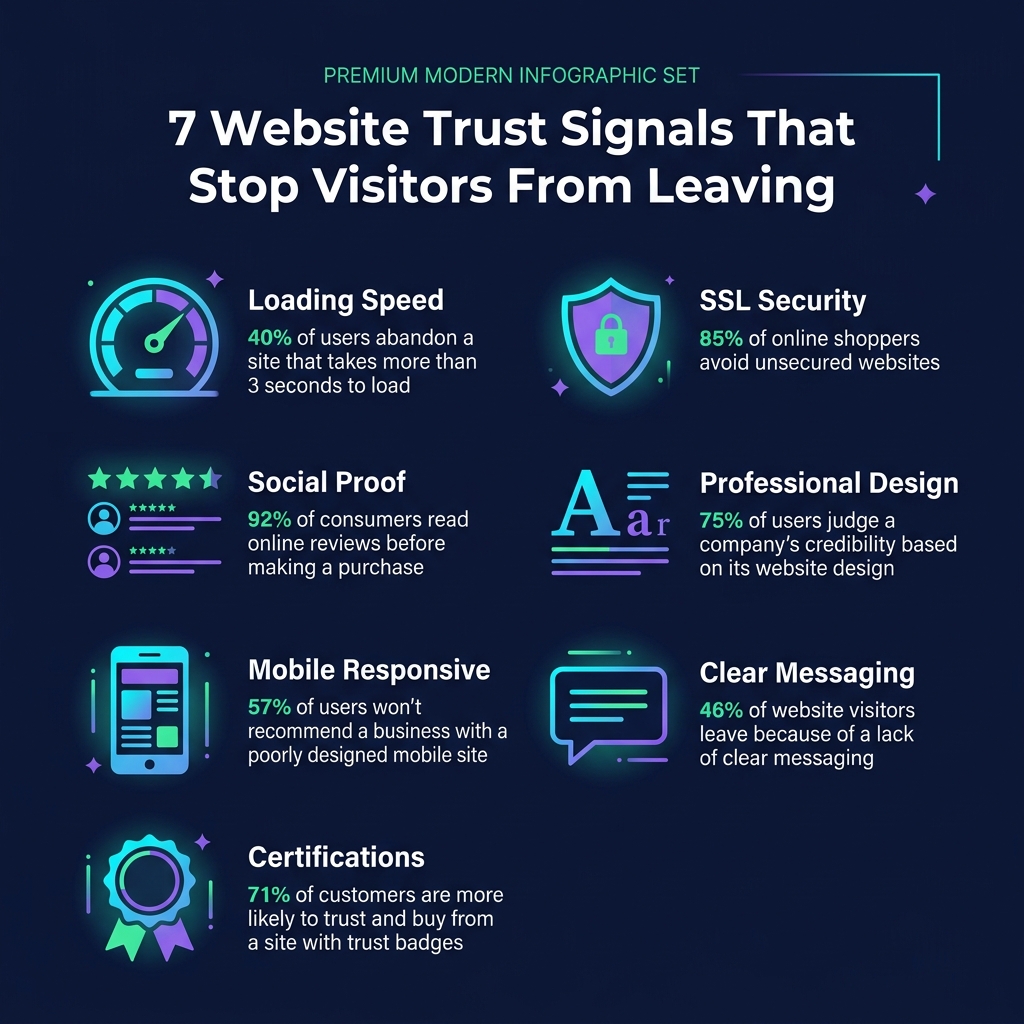
Real Data: Stanford University’s Web Credibility Research found that 75% of users judge a company’s credibility based on their website’s design. Not their product. Not their reviews. Their design. Visual appeal is the #1 factor in web credibility assessment.
Trust Signal #2: Loading Speed — “3 Seconds Is an Eternity Online”
The Psychology
When a website takes more than 3 seconds to load, something interesting happens in the brain: the Uncertainty Avoidance Response activates. Waiting without feedback creates anxiety — the brain interprets the delay as potential danger (“Is this site broken? Is it unsafe? Am I wasting my time?”). This is the same psychological mechanism that makes waiting at a red light feel longer when you are late for work.
Google’s research found devastating numbers:
- 1 to 3 seconds: Bounce probability increases by 32%
- 1 to 5 seconds: Bounce probability increases by 90%
- 1 to 6 seconds: Bounce probability increases by 106%
- 1 to 10 seconds: Bounce probability increases by 123%
Every additional second of load time is not just an inconvenience — it is a compounding trust penalty. By second 5, most visitors have not just left your site; they have formed a negative impression of your entire brand that will persist even if they encounter you again later. This is the Primacy Effect — first impressions are disproportionately sticky.
What Slows Down Most Websites
- Unoptimized images: A single 5MB hero image can add 4-8 seconds of load time on mobile connections
- Too many plugins: WordPress sites with 30+ plugins are loading scripts that most visitors never interact with
- No caching: Every visit loads everything from scratch instead of serving cached versions
- Heavy JavaScript frameworks: Using React or Angular for a simple business website is like using an 18-wheeler to deliver a pizza
- Cheap hosting: Shared hosting with $3/month plans serves your site from overloaded servers with high latency
The Fix
- Compress all images to WebP format — reduces file sizes by 60-80% without visible quality loss
- Implement browser caching and CDN (Content Delivery Network) for global visitors
- Audit and remove unnecessary plugins — each plugin adds JavaScript and CSS that slows loading
- Use lazy loading for images below the fold — only load images as visitors scroll to them
- Target a Largest Contentful Paint (LCP) under 2.5 seconds — this is Google’s Core Web Vital metric that directly impacts search rankings
Bottom Line: A slow website does not just frustrate visitors — it psychologically brands your business as incompetent. If you cannot manage a fast website, the visitor’s brain concludes you probably cannot manage their project, order, or service either.
Trust Signal #3: Social Proof — “Has Anyone Else Trusted This Business?”
The Psychology
Robert Cialdini’s Social Proof Principle, which I have referenced extensively in my brand psychology audits, is one of the most powerful trust mechanisms in human psychology. When we are uncertain about a decision, we look at what others have done — and follow their lead.
On a website, social proof takes many forms, and each carries different psychological weight:
- Client testimonials with full names and photos: Very high trust — a real person putting their reputation behind your business
- Client logos (“As featured in…” / “Trusted by…”): High trust — borrowing credibility from known brands
- Star ratings and review counts: Moderate-high trust — quantity of reviews matters as much as quality
- Case studies with measurable results: Highest trust — specific, verifiable outcomes prove competence
- Generic testimonials (“Great service!” – John D.): Low trust — they look fabricated because many are
The Critical Mistake Most Businesses Make
Most business websites either have zero social proof (the most common mistake) or have social proof placed on a separate “Testimonials” page that nobody visits. Social proof psychology works through proximity to decision points. Testimonials buried on page 5 of your site do nothing. A client testimonial placed directly next to your contact form or pricing table — exactly where the visitor’s anxiety peaks — can increase conversions by 34%.
The Fix
- Place at least one form of social proof on EVERY page — not just a dedicated testimonials page
- Position social proof elements directly adjacent to calls-to-action (contact forms, pricing, buy buttons)
- Use specific, measurable testimonials: “Shahzeb increased our conversion rate by 47% in 3 months” beats “Great work!”
- Include the client’s full name, company, and photo — anonymized testimonials carry 60% less psychological weight
- If you have worked with recognizable brands, display their logos prominently above the fold
Trust Signal #4: Clear Value Proposition — “What Do You Actually Do?”
The Psychology
The Cognitive Fluency Effect states that we prefer things that are easy to process mentally. A website that makes visitors work to understand what the business does, who it serves, and how to take the next step creates cognitive friction — and cognitive friction kills trust.
Research from the Nielsen Norman Group found that visitors decide whether a page is relevant to them in approximately 10 seconds. If your headline does not clearly communicate your value proposition in that window, the visitor leaves — not because they decided your service is wrong for them, but because they never understood it in the first place.
The “Curse of Knowledge” in Web Design
This is a concept from behavioral economics that perfectly explains why so many business websites fail at clarity. The Curse of Knowledge means that once you know something, you cannot imagine not knowing it. Business owners who live and breathe their industry assume visitors understand their jargon, their process, and their value. They do not.
Examples of cursed headlines I see constantly:
- “Synergizing Digital Solutions for Tomorrow’s Challenges” — What does this mean? Nobody knows.
- “We are a Full-Stack Digital Agency” — Okay, but what do you actually DO for me?
- “Innovation. Excellence. Results.” — These words mean nothing without specifics.
Compare with clear value propositions:
- “I build websites that convert visitors into customers — with zero plugins and maximum speed”
- “We design e-commerce stores that increase your sales by 30% or more”
- “Custom WordPress development for businesses that have outgrown templates”
The Fix
- Your homepage headline must answer THREE questions: (1) What do you do? (2) Who do you do it for? (3) Why should I choose you over alternatives?
- Write at a 6th-grade reading level — not because your audience is uneducated, but because simple language processes faster
- Replace every piece of jargon with plain language: “SEO optimization” becomes “getting found on Google”
- Test your headline with the “Mom Test” — if your mother cannot explain what your business does after reading your homepage, rewrite it
Trust Signal #5: Mobile Experience — “If It Breaks On My Phone, I Am Gone”
The Psychology
In 2026, over 63% of all web traffic worldwide comes from mobile devices. In Pakistan and developing markets, that number exceeds 75%. A website that is not fully responsive on mobile is not just losing traffic — it is actively signaling incompetence to the majority of its audience.
The psychology is straightforward: if a business cannot make their own website work on a phone in 2026, visitors unconsciously conclude that the business is either outdated, underfunded, or careless. All three conclusions destroy trust instantly.
Mobile trust failures include:
- Tiny text requiring pinch-to-zoom: Signals “we did not think about mobile users” (75% of your traffic)
- Buttons too small or too close together: Creates frustration and “fat finger” errors that feel like your site’s fault
- Horizontal scrolling: One of the strongest “this site is broken” signals on mobile
- Pop-ups that cannot be closed: Google actually penalizes these in mobile search rankings
- Forms with tiny input fields: Every difficult form field is a micro-frustration that compounds into exit
The Fix
- Design mobile-first, then adapt for desktop — not the other way around
- Minimum touch target size: 44×44 pixels (Apple’s guideline) — anything smaller frustrates users
- Test your website on at least 3 different screen sizes before launch
- Remove all pop-ups on mobile, or use bottom-sheet designs that are easier to dismiss
- Simplify navigation — mobile menus should have maximum 6-7 main items
Trust Signal #6: Security Indicators — “Is My Data Safe Here?”
The Psychology
The Threat Avoidance System in the human brain is always scanning for danger — including digital danger. In an era of data breaches, phishing attacks, and identity theft making headlines daily, visitors are subconsciously evaluating whether your website might harm them.
The following security signals either build or destroy trust:
- HTTPS/SSL certificate (the padlock icon): This is now a BASELINE requirement. 85% of users will not fill out a form on a non-HTTPS website. Google Chrome labels HTTP sites as “Not Secure” in bright red — a trust-destroying warning
- Clear privacy policy: A visible, readable privacy policy signals transparency and legal compliance
- Payment security badges: For e-commerce, Stripe, PayPal, and credit card logos near checkout reduce cart abandonment by 17%
- Physical address and contact information: Websites that hide their location and phone number trigger “scam” alerts in the brain
- Professional email domain: “info@yourbrand.com” builds trust; “yourbrand.info@gmail.com” destroys it
The Fix
- Install SSL certificate immediately — most hosting providers offer free SSL through Let’s Encrypt
- Display your physical address, phone number, and professional email in the footer of every page
- Add a clear, accessible privacy policy page with plain-language explanations
- If you accept payments, display relevant security badges near the checkout area
- Use a professional domain email for all customer-facing communication
Trust Signal #7: Content Quality — “Does This Business Actually Know What They Are Talking About?”
The Psychology
Cialdini’s Authority Principle states that we automatically trust people and organizations that demonstrate expertise. On a website, authority is demonstrated through content quality — the depth, accuracy, and usefulness of the information provided.
A website with thin, generic content (“We provide quality services at affordable prices”) signals that the business either lacks expertise or lacks the care to demonstrate it. Conversely, a website with deep, researched, insightful content signals: “This person really knows their field. I can trust their expertise.”
This is exactly why I write these in-depth articles on UX Psychology — each article serves as a trust-building mechanism that demonstrates genuine expertise, not just marketing claims.
Content Signals That Build Trust
- Blog articles with real depth: Long-form, researched content (2,000+ words) signals expertise far more than shallow 300-word posts
- Original research and data: Citing specific studies, statistics, and academic sources adds credibility layers
- Case studies with results: Showing before-and-after outcomes with measurable data is the strongest proof of competence
- Consistent publishing: A blog with regular posts signals an active, invested business; a blog last updated in 2023 signals abandonment
- Author attribution: Content attributed to a named expert with credentials is trusted 40% more than anonymous corporate content
The Fix
- Publish at least 2 high-quality blog posts per month — quality over quantity, always
- Include the author’s name, photo, and credentials on every article
- Reference specific research, data, and examples — vague claims erode trust
- Create a dedicated “About” page with your team’s qualifications and experience
- Regularly update older content to keep it current and relevant
The Trust Audit Checklist: Score Your Own Website
Use this framework to evaluate your website’s trust signals. Score each item from 0 (not present) to 10 (excellent implementation):
Visual Design (Max 10 points)
- Professional, modern aesthetic with cohesive color scheme
- High-quality images (no pixelated stock photos)
- Generous whitespace and clear visual hierarchy
- Custom design (not a recognizable template)
Loading Speed (Max 10 points)
- Homepage loads in under 3 seconds on mobile
- Images optimized and lazy-loaded
- Core Web Vitals all in “Good” range
- CDN implemented for global visitors
Social Proof (Max 10 points)
- Client testimonials with full names and photos
- Case studies with measurable results
- Client logos or “as featured in” section
- Social proof placed near calls-to-action
Value Proposition Clarity (Max 10 points)
- Homepage headline answers: what, who, why
- No jargon — plain language throughout
- Clear call-to-action above the fold
- Passes the “Mom Test”
Mobile Experience (Max 10 points)
- Fully responsive on all screen sizes
- Touch targets meet 44×44px minimum
- No horizontal scrolling or broken layouts
- Mobile navigation is simple and intuitive
Security (Max 10 points)
- HTTPS enabled with valid SSL certificate
- Privacy policy clearly accessible
- Physical address and contact info visible
- Professional domain email used
Content Authority (Max 10 points)
- Blog with regular, high-quality posts
- Author attributed with credentials
- Specific data and research cited
- Content updated within last 6 months
Scoring Interpretation:
- 60-70 points: Your website is trustworthy and likely converting well
- 40-59 points: Your website has significant trust gaps that are costing you customers
- Below 40 points: Your website is actively repelling potential customers — urgent redesign needed
Want a professional trust audit of your website? As a Web Developer and UX Psychologist, I analyze websites through both technical and psychological lenses — identifying the invisible friction points that are silently killing your conversions. Get in touch for a comprehensive website psychology audit.
The Bottom Line: Trust Is Not Optional — It Is Your Most Valuable Digital Asset
In a world where visitors decide your website’s fate in 50 milliseconds, trust is not a nice-to-have — it is the foundation that everything else is built upon. You can have the best product, the most competitive pricing, and the most compelling content — but if your website fails the trust test, none of it matters because nobody will stay long enough to discover it.
The 7 trust signals in this article are not theoretical — they are backed by decades of research in behavioral psychology, cognitive science, and user experience. And the beautiful thing is that every single one of them is fixable. A professional redesign, image optimization, strategic social proof placement, clearer messaging, mobile responsiveness, security upgrades, and quality content — these are all investments that pay for themselves many times over in increased conversions, lower bounce rates, and higher customer lifetime value.
Remember: your website is not a brochure. It is a trust engine. Every design element, loading speed metric, testimonial, headline, and security indicator either builds trust or erodes it. There is no neutral. And in 2026, when your competitors are one click away, trust is the only competitive advantage that cannot be copied.
The Paradox of Trust: Visitors who trust your website spend 3x longer on your pages, are 2.4x more likely to contact you, and are 5x more likely to recommend you to others. Trust does not just convert visitors into customers — it converts customers into advocates. And advocacy, as any psychologist will tell you, is the most powerful form of marketing that exists.
Muhammad Shahzeb is an Industrial & Organizational Psychologist (MSc) and Professional Web Developer who helps businesses apply behavioral psychology to improve conversions, user experience, and brand trust. Read more on UX Psychology | Brand Psychology Audits | Psychology Counseling | Career Coaching